
A step-by-step guide to making fresh herb sourdough in a Rational iCombi Pro
21/02/2024
This artisanal recipe seamlessly blends the richness of grated Parmesan cheese, aromatic herbs, and the precision of the RATIONAL iCombi Pro’s Intelligent Cooking Path. Immerse yourself in a culinary journey where each step, from kneading the dough to the final touches, is meticulously curated for an unparalleled gastronomic experience.
Ingredients:
- 1 cup active sourdough starter
- 1 1/2 cups lukewarm water
- 4 cups high-quality bread flour (you can use a mix of white and whole wheat flour for added flavour)
- 1 1/2 teaspoons salt
- 1/2 cup grated Parmesan cheese
- 1/4 cup chopped fresh herbs (such as rosemary, thyme, or basil)
- 1/4 cup extra-virgin olive oil
- Flaky sea salt for topping (optional)
Instructions:
Preparing the Dough:
- In a large mixing bowl, combine the active sourdough starter and lukewarm water. Stir until well combined.
- Add the bread flour, salt, grated Parmesan cheese, chopped herbs, and olive oil to the bowl. Mix with a wooden spoon or dough whisk until the dough comes together.
Kneading the Dough:
- Lightly flour a clean work surface. Transfer the dough onto the floured surface. Knead the dough for about 15-20 minutes until it becomes smooth, elastic, and incorporates the cheese and herbs evenly.
Proof-to-baking in RATIONAL iCombi Pro:
- Using the Intelligent Cooking Path on the RATIONAL iCombi Pro select the bakery mode on the main screen, and select bread in the cooking patch.
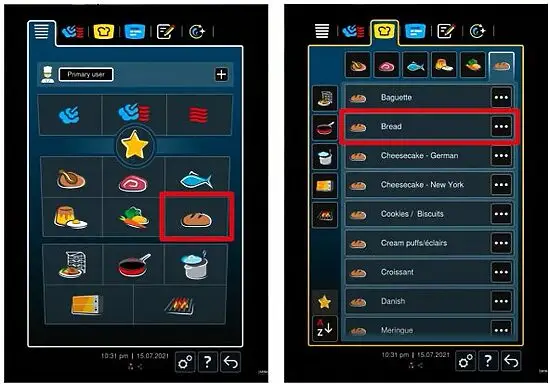
Image: RATIONAL iCOMBI PRO – Main menu and cooking patch display screen
- Select the desired parameters – in this recipe, we are utilising the without prob option and setting our own cooking times. *With prob allows to cook with time, without prob when baking large loaves of bread). Choose the coloration you want to reach while baking.
- Set the cooking time to 30 minutes.
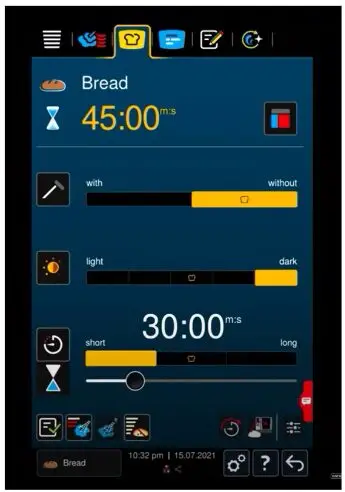
Image: RATIONAL iCOMBI PRO – Cooking parameters display screen
- At the bottom left, first, select the steam injection option at the maximum level to ensure a moist environment.
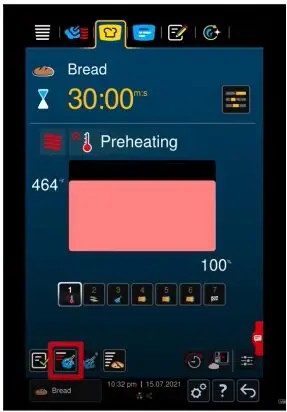
Image: RATIONAL iCOMBI PRO – Steam injection display screen
- Select the proof-to-bake option as well as your desired level of proofing – Level 3. After your dough has been proofed in the oven it will go directly into the baking.
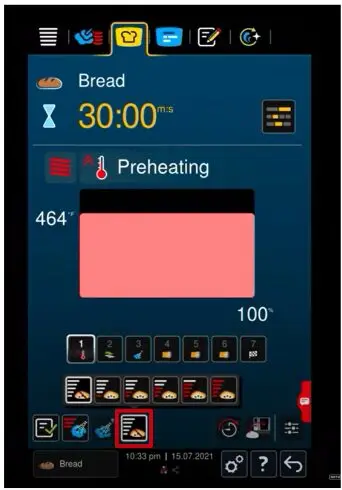
Image: RATIONAL iCOMBI PRO – Proofing display screen
- After preheating, place the sourdough in the oven and let the iCombi Pro do its thing.
- When the iCombi starts flashing, the end of the baking process has been reached. At the bottom of the screen you will see options have occurred that show end options, where you can decide if you want the extend the cooking time.
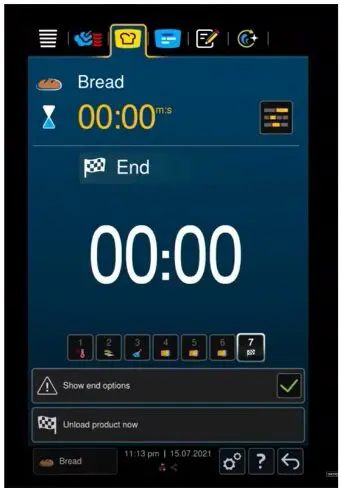
Image: RATIONAL iCOMBI PRO – End of cooking display screen
- If happy remove the fresh-backed sourdough loaf from the oven and place it on a cooling rack, Brush the top of the bread with a little extra-virgin olive oil and sprinkle with flaky sea salt for an extra gourmet touch. Wait until the loaf has cooled down.
If you want to know more about the RATIONAL iCombi Pro get in touch with one of our friendly sales consultants.

More articles
- 25/04/2025 THE TRUE COST OF FRYING OIL WASTE (AND HOW TO STOP IT) – HENNY PENNY
- 20/02/2025 UPGRADE YOUR KITCHEN WITH THE HENNY PENNY F5 OPEN FRYER
- 14/02/2025 BAKING RED VELVET BROWNIES WITH WHITE COCOLATE IN THE RATIONAL ICOMBI PRO
- 16/01/2025 SPICE UP YOUR MENU: PERFECT DEEP-FRIED CHICKEN WINGS WITH HENNY PENNY PFE500
- 20/11/2024 Tomahawk Steak with Chimichurri Marinade on the Synergy Chargo